Bringing my photos home
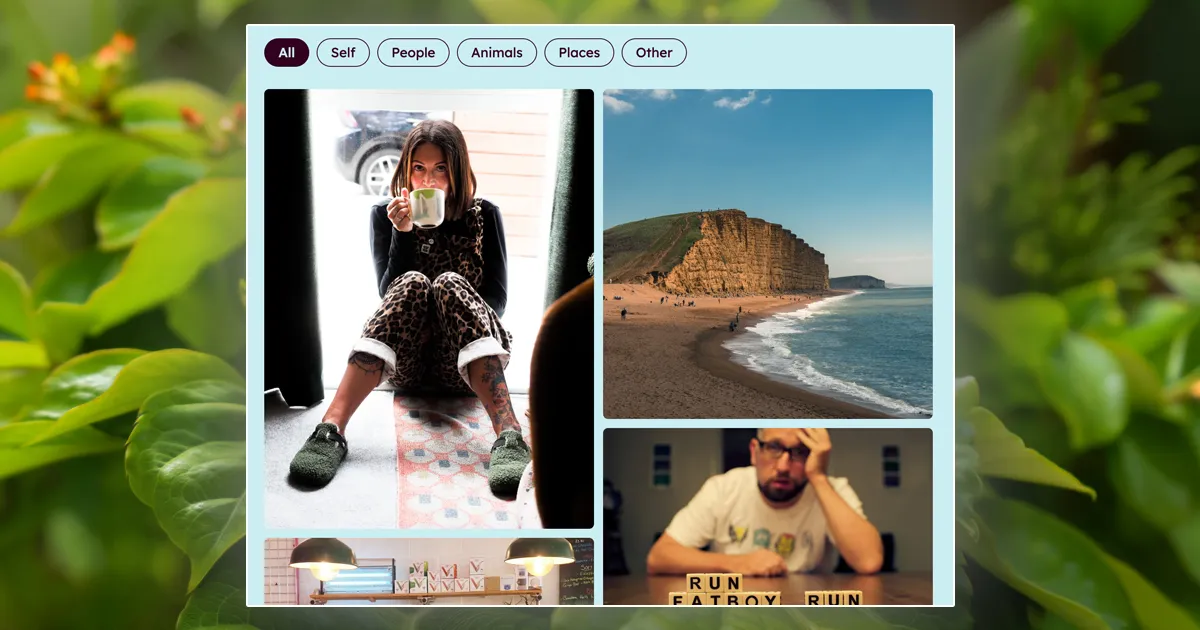 For a fair few years now, my photos have lived on a separate subdomain powered by Adobe Portfolio (
photos.hellostu.xyz). At the time, setting it up was a no-brainer: you pick a layout, click sync inside Lightroom, and your albums appear online with zero fuss.
In reality though, it always felt like a bit of an annex.
The fonts and colours never matched the rest of this site, flicking between the two felt disjointed, and since rebuilding this site earlier in the year (as a digital garden) it has increasingly bothered me that a big chunk of things I care about felt like they were left hanging around elsewhere in the digital ether.
This weekend I finally pulled the plug on the Adobe subdomain, set up a quick 301 redirect in Cloudflare so old links don’t break, and brought my photography home to a proper gallery page right here on the site.
Workflow Changes
The main reason I kept putting off hosting photos natively was the thought of maintenance. I really didn’t fancy having to fire up VS Code, edit raw YAML files, rename images, and push git commits every single time I wanted to add a picture. I’m a nerd but a lazy one!
The turning point was moving the site’s content management over to Sveltia CMS.
Having a clean web interface to upload and curate things changed the equation completely. Now, adding a photo is just a case of opening the admin panel, dropping in an image, giving it a title, and picking a category.
Is it quite as effortless as hitting “Sync” straight out of Lightroom? Probably not. But given I only really update my portfolio in occasional, considered batches rather than frequent dumps (head to my instagram for those), that slight trade-off is well worth it. Having everything living under one roof—using the same styling, typography, and codebase—far outweighs a few extra clicks once in a blue moon.
A few things I wanted to get right
Building the gallery natively meant I could set it up exactly how I wanted, retaining what I loved about the old one but making some improvements along the way:
- Keeping the masonry grid: I’ve never been a fan of rigid square crops that butcher portrait shots. The layout here still flows across a single column on mobile and two columns on desktop landscape, keeping every photo in its original aspect ratio.
- Simple category filters: Rather than cluttering the site with separate sub-galleries, there’s a simple set of pills at the top to filter between Self, People, Animals, Places, and Other.
- Deep linking to individual photos: One thing that always bugged me about third-party portfolios was how awkward it was to share a single picture. Now, every photo has its own link (like /photos#vape-dancing or /photos#iron-banana). If you open one of those links, it jumps straight to that photo and pops it open. There’s even a little copy-link button in the top bar to grab the URL in one click.
- Hands-off camera details: To save me having to dig around looking up what camera I used or when a shot was taken, the build script reads the EXIF data automatically in the background. It extracts the capture date (e.g.
Aug 2025) and camera gear (e.g.Olympus E-M1 Mark III • 12-40mm F2.8 Pro), so I only ever have to provide a title.
Tidying up the garden
A big part of keeping a personal website is about ownership and keeping things tidy. Relying on detached hosted tools often means your creative work ends up scattered across the web in little forgotten silos.
Having my photography sitting alongside my weeknotes, writing, and other experiments makes the place feel much more cohesive and more personal.
If you fancy a browse through the archive, head over to the new Photos page and have a flick through!
What to read next
- Fresh paintWork
I once went down a proper rabbit hole trying to slash my hosting bills and make this site run on renewable energy, where I learnt that a greener website is often just a faster one 🌍.
- Curation for the curiousRest
How I took back control from the algorithms to rebuild a healthier web diet, swapping endless feeds for quiet RSS subscriptions, underground soul mixtapes, and intentional reads 📻.
- Clean and rebuildPlay
A rather geeky look at how I knocked down some digital walls to rebuild this entire site into a calmer, tidier garden space—mostly so I'd stop procrastinating and actually write 🤓.